






Key takeaways
- Check for the correct healthcare number to ensure the claim is sent to the correct insurance payer.
- Avoid fee conflicts and use premium modifiers correctly to improve your likelihood of successful claims.
- Promptly address rejections arising from entry errors, submission errors, or requests for further documentation to stay atop of your medical billing.
Medical billing in Alberta can be complicated.
Few things are more frustrating than discovering your AHCIP medical billings have been rejected. Equally frustrating is discovering your submitted billings were underpaid for less than the accurate amount. Correcting these errors is time-consuming, which slows care delivery, weakens clinic growth, and increases staff burnout.
Read on for five ways to reduce your claim rejections, improve billing revenue, and build a billing structure for log-term stability.
1. Ensure patients have a valid Health Care Number before submitting
Invalid healthcare identity is the one of the biggest sources of Alberta medical billing rejections. Checking for the correct healthcare number will ensure the claim is sent to the correct insurance payer. Each patient in Alberta is issued with a Unique Lifetime Identifier (ULI). For patients with AHCIP insurance coverage, this ULI will match their Alberta Personal Healthcare Number (PHN). For out of province patients (OOP), the ULI and PHN will be different.
Different health regions display these numbers in different ways. Here are three possibilities:
Showing PHN with province
Some Alberta health regions show the PHN and the patient’s home province on the sticker:
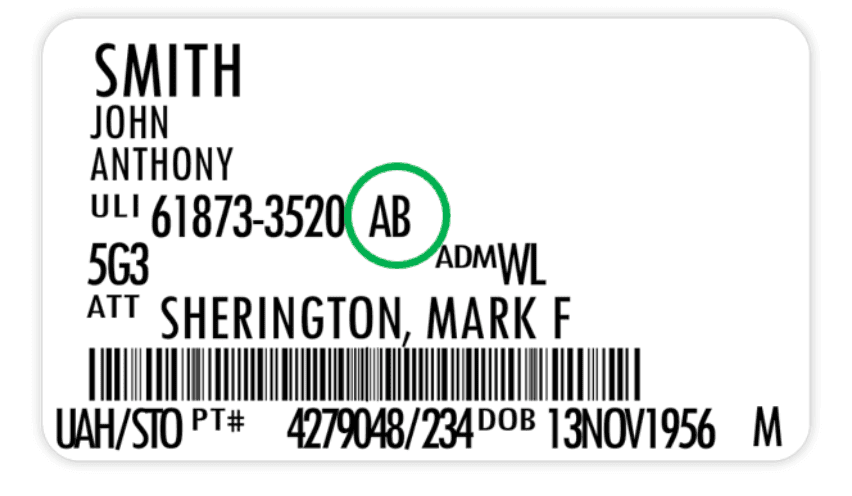
Showing ULI with province
Other health regions show only the ULI number with the patient’s home province. If AB follows the ULI, then you have an Alberta PHN. If it’s a different province, you have an out of province patient, so you must look up their Registration Number (OOP PHN) on Netcare.
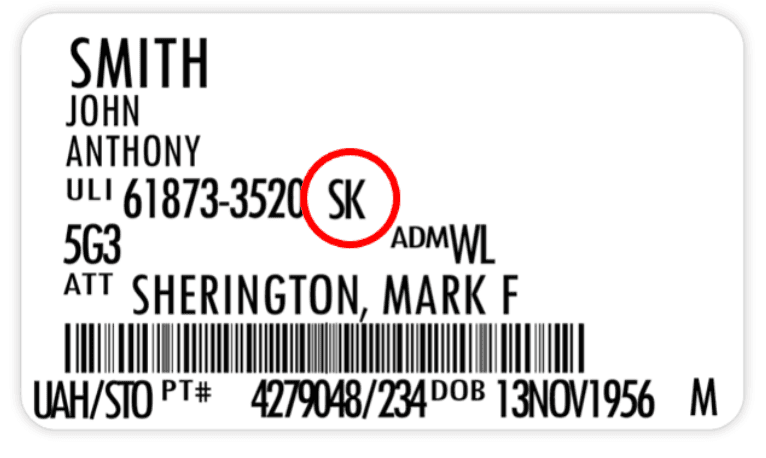
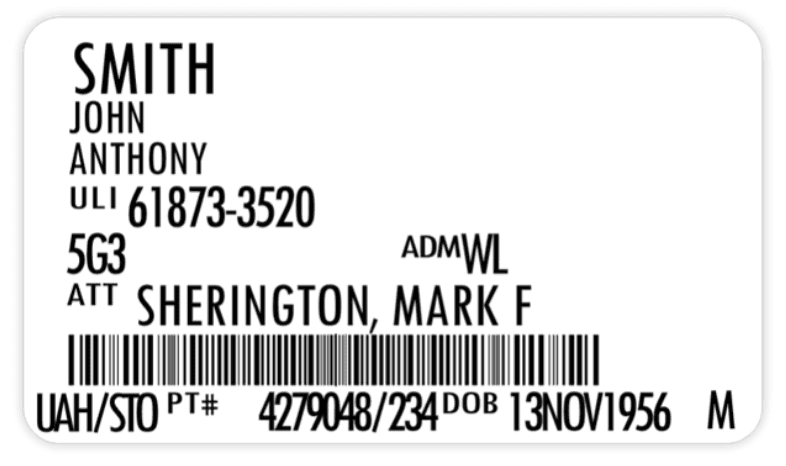
Showing ULI only
On more recent Connect Care stickers, only the ULI is shown, so physicians must look up every patient on Netcare to find their province of insurance.
If the patient has no provincial health care coverage, you must submit via non-provincial health coverage. This spans Workers Compensation Board (WCB), Department of National Defense, refugees, prisons, or private insurance coverage.
Note: The Alberta government has reintroduced Good Faith claims that allow physicians to bill for presumed Alberta residents not yet enrolled in AHCIP.
2. Prevent submission errors
There are many restrictions on how AHCIP medical codes are billed. Make sure you submit claims with all the required information to avoid conflicts. Here are four actions to ensure submission stability:
☐ Include the correct functional centre:
Certain medical billing codes can only be claimed with specific functional centres. For example, AHCIP code 10.04B—
Intubation performed in an emergency room
may only be claimed when performed in an emergency room, function centre, AACC, or UCC.
☐ Avoid fee code conflicts:
Certain medical billing codes cannot be claimed with other medical billing codes. For example, AHCIP code 03.08CV
– Comprehensive consultation via telephone or secure videoconference
may not be claimed on the same day by the same physician for the same patient as other telephone/videoconference codes (03.01AD, 03.01S, 03.01T, 03.03CV, 03.03FV, 03.05JR, 08.19CV, 08.19CW, or 08.19CX).
☐ Correctly use premium modifiers:
Premium modifiers increase the value of AHCIP codes and help to accurately optimize your claims.
Invalid usage will result in the claim being rejected. For example, if you work on a Wednesday and add a weekend (WK)
premium modifier, the claim will fail.
☐ Include referring physicians:
All consultations require a referring physician to be indicated on the claim.
If you miss providing the referring physician, your medical billing claims will be rejected.
3. Record your time
Tracking your time is vital to improved billings. Recording precisely how much time you spend with a patient will allow you to ensure your claims are accurate. Here’s how you can use time records with your AHCIP medical billing:
After-hours time premiums: There are four after-hours time premiums that Alberta physicians apply to their medical billings. These premiums may be added to claims for services performed during the relevant time periods:
- NTAM (Nighttime AM): Covers 0000-0700 for everyday of the week
- NTPM (Nighttime PM): Covers 2200-2400 for everyday day of the week
- EV (evenings): Covers 1700-2200 for weekdays
- WK (weekends): Covers 0700-2200 for weekends and Statutory holidays
Be careful to use the correct after-hours time premium during the applicable period. If you submit an after-hours time premium that is incorrect, even if a different equivalent after hours-time premium is applicable, the claim will be rejected.
Complex modifiers: These are used to indicate a complex patient consultation or visit requiring that the physician spend above a certain number of minutes or more on management of the patient’s care. These include CMGP, CMXV15, CMXV20, CMXV30, CMXV35, or CMXC30.
- Note: The total time you spend on the patient’s care is applicable (not just the time you spend with the patient), but you must use them on the same day your patient is seen.
Each modifier is restricted to use with designated AHCIP billing codes, so check to see which complex modifiers are applicable.
The Alberta Medical Association recommends that any time-based codes should be recorded (at a minimum) from the start and end times of physicians’ work on a given day. Physicians should also note any non-working period during the day. Other documentation advice is available here.
4. Manage your errors and rejections
Despite diligently following all the advice above, AHCIP rejections are going to happen.
Rejections arise from entry errors, submission errors, requests for further documentation, or even assessment of errors by the insurance payer. It is important to promptly address rejections, particularly following the Alberta Government Schedule of Medical Benefits changes.
- Tip: AHCIP mails physicians Statement of Account and Statement of Assessment reports that include error codes —don’t miss these! These reports detail which of your claims have been paid, underpaid, or rejected.
Rejection management, while time-consuming, is important in receiving your earned revenue. Depending on specialty and practice type, up to 8% of manual claims get rejected on first submission.
Failure to properly manage medical billing rejections will result in significant lost earnings over the long term.
5. Follow your claims
The ability to follow all your claims as they are processed is a big help in understanding what’s getting paid and what isn’t.
Following your claims is a great way to learn more about your billings and avoid errors that result in unpaid claims. This means leveraging a biller that provides you with transparency to all your claims.
Tracking your claims also helps you identify patterns, whether good or bad. You may notice that certain codes are consistently underpaid, that specific modifiers are missed during busy periods, or that claims from certain days often require more corrections. Deploy these insights to make necessary adjustments and drive your practice success.
Use a trusted AHCIP billing tool
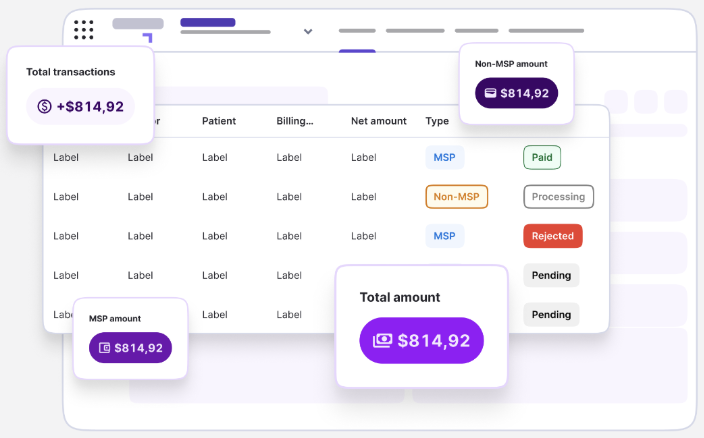
Petal Billing provides centralized, tailored medical billing solutions for Alberta physicians via self-serve or fully managed for AHCIP, WCB, private, and out-of-province claims. Access real-time claim status and code tracking at every step, as well as remittance reception and automated payment reconciliation.
- Our recent independent study, How medical billing solutions are transforming physician practice, found physicians using Petal Billing reported an average revenue increase of 9.4% compared to manual billing.
Our advanced medical billing tool provides:
- EMR-connected claim automation.
- Provincial code validation and error checking.
- Real-time claim status and remittance tracking.
Ready to maximize your medical billing?
Contact a Petal expert and we’d be happy to help.