







Key takeaways
- Manual billing offers direct control: Physicians manage each claim themselves, but they also assume responsibility for code selection, submission, payment tracking, and follow-up.
- Billing solutions simplify the entire billing cycle: Modern medical billing software centralizes claim entry, validation, submission, payment tracking, and corrections while supporting more efficient workflows.
- Automation catches billing issues before they become payment issues: Medical billing software flags missing information, invalid billing codes, or incomplete claims before submission.
You have options when it comes to medical billing. There’s managing it manually or with a dedicated billing solution. Manual workflows place claim entry, submission, payment tracking, and follow-up entirely in the physician’s or clinic team’s hands. A medical billing solution supports these activities through billing software, workflow automation, centralized claim management, and, depending on the provider, expert billing support.
Starting independent practice brings a long list of new responsibilities.
You need to establish where you will practice, understand your compensation model, build your schedule, maintain clinical documentation, and manage the administrative work that supports your income.
One of the most important decisions is how you’ll manage your medical billing.
Physicians have the option to prepare and submit their own claims, review remittance statements, correct refused claims, and track payments independently. Alternatively, some physicians pay (a significant amount) for a medical office assistant to manage their billing.
- The challenge: Billing doesn’t end once a claim has been submitted.
But physicians managing billing manually must also confirm what their provincial billing authority processed, interpret explanatory codes, correct discrepancies, monitor payments, and stay current as billing rules evolve.
Specialized billing solutions organize this work into a structured digital workflow. Read on to see how each approach changes the day-to-day billing experience.
A brief comparison: Manual billing vs. Billing solution
|
Manual medical billing |
Billing solution |
|
Research billing codes and requirements independently |
Access billing guidance within dedicated billing software |
|
Enter patient and claim information manually |
Use streamlined entry tools, saved information, and mobile access |
|
Review every detail before submission |
Receive automated validation and error alerts |
|
Submit claims and maintain separate records |
Submit and monitor claims from one centralized platform |
|
Track refused claims manually |
Use organized claim tracking and, where available, expert support |
|
Monitor billing updates independently |
Receive software updates and workflow guidance as billing rules change |
Manual medical billing is familiar but demanding
Manual billing means that you or someone within your practice remains responsible for the entire billing cycle.
This may include:
- Verifying patient information
- Selecting the appropriate provincial billing code
- Adding required modifiers or billing information
- Ensuring documentation supports the billed service
- Submitting claims
- Reviewing remittance statements
- Correcting refused claims
- Following up on outstanding payments
This approach can work for practices with predictable billing, manageable claim volumes, or experienced administrative support.
And manual billing doesn’t necessarily mean paper. Many physicians use basic digital tools while still completing claim validation, payment reconciliation, and follow-up themselves.
The trade-off is time and attention.
Successful medical billing depends on multiple pieces of information aligning correctly. Missing information, unsupported billing codes, incomplete documentation, or incorrect claim details delay payment or lead to claim refusals. These mistakes cost time and revenue.
Submission timelines also vary between provinces, making it important to understand your provincial billing requirements and monitor remittance statements consistently.
Physicians using Petal gained $34,346 more annually on average compared to manual billing.
How does manual billing differ from billing software solutions?
A medical billing solution brings billing activities together within software designed specifically for physician claims.
Instead of assembling information across multiple documents, spreadsheets, portals, and notes, physicians enter, validate, submit, and monitor claims from one workflow.
- Plus, advanced solutions include billing services like expert support from claim through payment.
Modern medical billing software may include:
- Rapid claim entry
- Mobile and web access
- Automated claim validation
- Electronic claim submission
- Revenue projections
- Digital remittance statements
- Payment reconciliation
- Reporting dashboards
Physicians remain accountable for the claims submitted under their name, regardless of whether they use billing software or administrative staff.
The difference is that physicians are no longer relying exclusively on memory and manual review.
A billing solution provides structure, automation, visibility, and a complete record of billing activity throughout the revenue cycle.
Five ways a billing solution improves your workflow
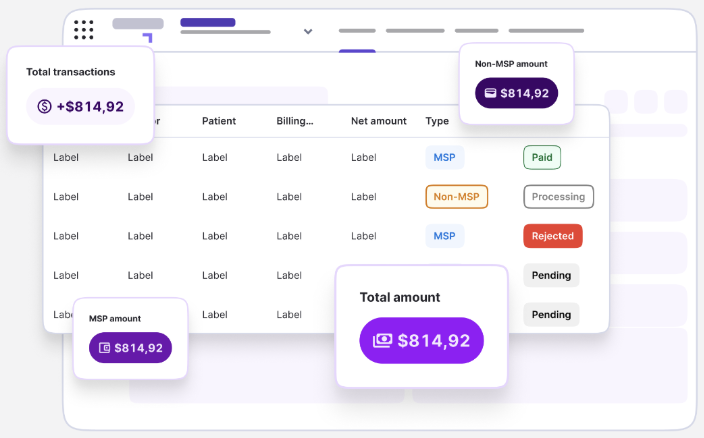
Here’s how a billing software solution transforms daily billing compared with manual workflows.
1. Enter claims with fewer repetitive steps
Dedicated medical billing software simplifies claim entry through saved information, mobile access, quick-entry tools, workflow automation, and integrations with other clinical systems.
Some platforms also integrate with electronic medical records, limiting duplicate data entry. That means physicians complete billing while patient encounters remain fresh instead of building a backlog later.
Example: An Alberta physician completes several evening hospital visits but doesn’t bill them until weeks later. Reconstructing which encounters qualified for after-hours modifiers becomes difficult, resulting in missed eligible billings. Recording services immediately after each encounter makes it much easier to capture applicable modifiers.
2. Catch potential billing issues before submission
Medical billing software validates claim information as it’s entered and may identify:
- Missing patient information
- Invalid billing codes
- Incompatible code combinations
- Missing diagnoses
- Required billing elements
- Incomplete claim information
These alerts allow physicians to correct issues before submission.
A strong first-pass validation process supports more accurate payments while minimizing the administrative work associated with corrections.
Example: A BC family physician submits an MSP claim for a virtual visit but forgets to include the required telehealth claim note. The care was appropriate, but the claim is flagged during processing and payment is delayed. Automated validation would have identified this omission before submission.
3. Keep claim information in one place
Manual billing spreads information across notes, spreadsheets, remittance statements, emails, and personal reminders.
A billing solution centralizes:
- Claims entered
- Claims submitted
- Expected revenue
- Payments received
- Refused or adjusted claims
- Outstanding follow-up
This visibility makes it easier to answer important questions like: Was a claim submitted? Was it processed? Has payment been received? Does the payment match expectations? Is follow-up still required?
Example: An Ontario physician notices during payment reconciliation that several counselling claims were rejected because referral information was incomplete. Because every submitted claim, remittance, and outstanding item is tracked in one place, the pattern is identified corrected before it affects future OHIP submissions.
4. Respond to refused claims faster
Even well-managed practices receive refused claims.
Many billing solutions also include access to experienced billing specialists who review remittance statements, explain refusal reasons, support claim corrections, and help navigate provincial billing requirements when unusual situations arise.
Example: A Quebec physician receives a RAMQ refusal after submitting a claim with an incorrect contextual element. Instead of manually comparing account statements against spreadsheets, the physician uses a structured workflow to identify the refusal reason and promptly resubmit it.
5. Build a workflow that grows with your practice
The billing process that works during your first year may not be the right fit several years later.
A manual workflow that depends on memory and personal tracking can become increasingly difficult to manage. A flexible billing solution provides consistent workflows while adapting to growing claim volumes and changing administrative needs.
12,000+ providers and administrators trust Petal to simplify their billing.
When should you consider switching from manual billing?
There isn’t a single point in every physician’s career when a billing solution becomes necessary.
However, it may be time to reassess your workflow if:
- Billing regularly extends into evenings or weekends
- Claims aren’t being entered promptly
- You’re relying on spreadsheets or personal reminders
- Refused claims are becoming difficult to manage
- You’re unsure whether payments match submitted claims
- Your billing requirements have become more complex
- You want expert guidance interpreting billing requirements or resolving difficult billing scenarios
When comparing options, consider more than software cost alone.
Think about the value of your time, the work involved in correcting claims, the visibility the platform provides, and the long-term efficiency of your billing process.
Make your medical billing sustainable
Our opinion? Manual billing isn’t worth the time and energy it usually requires.
Medical billing solutions will save you hours for reinvesting into business growth, team building, leisure, or whatever else you want.
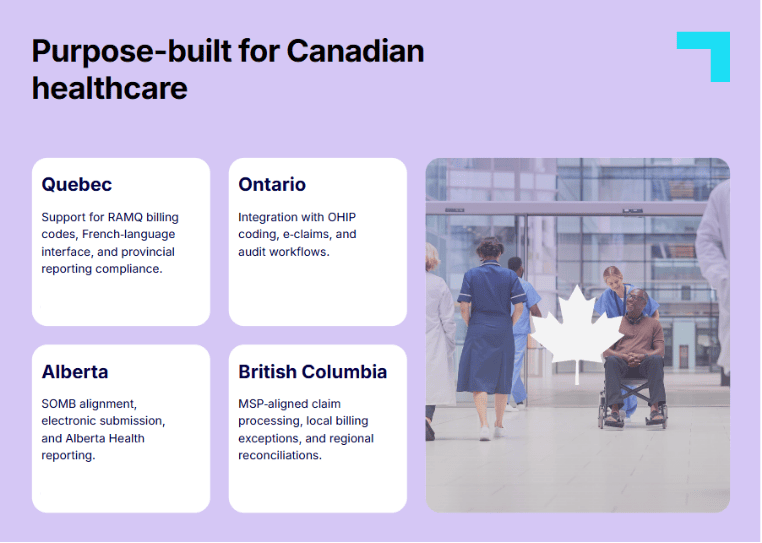
Petal Billing provides tailored medical billing solutions for physicians in Alberta, British Columbia, Ontario, and Quebec. Achieve a higher claim acceptance rate for more stable revenue and less time managing rejected claims.
- Proof: Physicians using Petal Billing reported an average revenue increase of 9.4% and 3.1 hours saved per week compared to manual billing.
Establishing your billing workflow on an effective software solution will support more accurate payments and long-term confidence.
Enjoy the benefits of efficient billing:
FAQs: Manual medical billing vs. a billing software solution
Can physicians manage medical billing without billing software?
Yes. Physicians can manage claims independently without using billing software. They remain responsible for claim preparation, submission, payment tracking, remittance statement reviews, claim corrections, and compliance with provincial billing requirements.
What is the main difference between manual billing and a billing solution?
Manual billing requires physicians or clinic staff to research, prepare, submit, and monitor claims themselves. A billing solution combines medical billing software with workflow tools and, in many cases, expert support that centralizes these activities.
Does a billing solution guarantee claim acceptance?
No. Billing solutions help identify common errors and improve consistency, but they cannot guarantee that every claim will be accepted. Claims must still comply with applicable provincial billing requirements and be supported by appropriate documentation.
Does medical billing software remove physician responsibility for claims?
No. Physicians remain responsible for the accuracy, compliance, and documentation associated with their claims, even when billing software or billing specialists assist with the process.
Is manual medical billing appropriate for new physicians?
It can be, particularly for physicians with straightforward billing and sufficient time to learn provincial billing requirements. Physicians looking for onboarding, automation, validation, or ongoing guidance may benefit from a dedicated billing solution that combines software with expert support.
When is a hybrid billing solution the best fit?
Hybrid billing solutions are well suited to physicians who want the visibility and efficiency of medical billing software while also benefiting from experienced billing professionals who help manage complex claims, payment tracking, remittance statement reviews, and claim corrections.