






Points clés à retenir
- For physicians, automation creates more scheduling autonomy. Mobile access, self-service shift swaps, and real-time updates make it easier to manage a schedule without relying on emails or updated spreadsheet files.
- For department chiefs, the biggest change is visibility. Scheduling rules, fairness, coverage requirements, and potential gaps become easier to manage across the department.
- For administrators, automation reduces the work around the schedule. Instead of manually coordinating every change, teams spend more time managing exceptions and operational priorities, while enjoying better shift coverage.
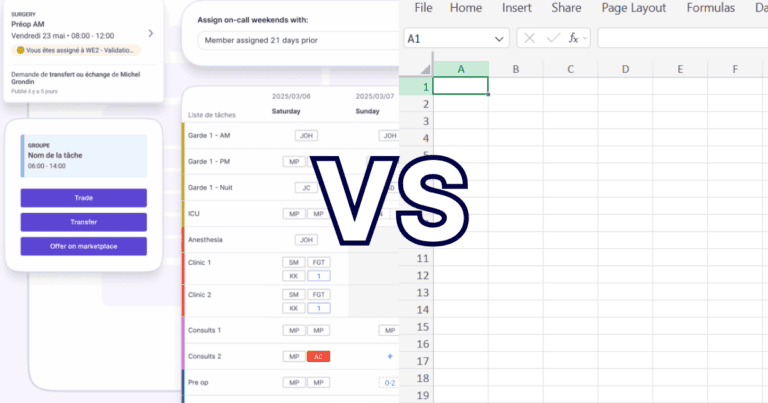
Automated physician scheduling software allows healthcare teams to build and manage physician schedules more efficiently than spreadsheets. It does this by applying scheduling rules, centralizing availability and absences, and keeping changes visible in real time. Compared with manual spreadsheet scheduling, automation provides more control and greater visibility.
Physician schedules have too long been stuck in a closed box. A series of boxes known as a spreadsheet. The harder question is: how much work does it take to keep it there?
Every vacation request, shift exchange, unexpected absence, and coverage change creates another task. Someone has to update the file, confirm the change, communicate it, and make sure everyone is looking at the latest version.
Automated physician scheduling software approaches the problem differently.
Instead of treating the schedule as a document, it turns scheduling into a live workflow where rules, availability, changes, and coverage can be managed in one place.
And the benefits are different depending on who you ask.
- At the Centre hospitalier de l’Université de Montréal (CHUM), replacing manual Excel-based scheduling with an automated workforce scheduling solution led to 98% less time spent creating schedules and a 70% reduction in scheduling costs. Staff satisfaction reached 92%, with easier shift swapping contributing to better work-life balance.
Here’s what that change looks like for the people actually using the schedule.
A brief comparison: Automated scheduling vs. Spreadsheets
Who | With automated physician scheduling software | With spreadsheets |
médecins | Physicians submit availability, request time off, manage eligible shift exchanges, and see approved changes in a live schedule. | Shift changes require emails, texts, administrative follow-up, and checking whether the latest spreadsheet is still current. |
Department chiefs | Scheduling rules and constraints are built into the process, while live visibility makes coverage gaps and other issues easier to identify. | Scheduling rules, coverage requirements, fairness, and workload distribution are hard to view and depend heavily on manual oversight. |
Administrators | Routine scheduling work is automated or centralized, allowing administrators to spend more time on operational priorities. | Teams manually collect availability, build assignments, enter absences, coordinate replacements, and communicate changes. |
For physicians: More control over a schedule that affects your life
Physicians generally don’t care how many hours it took to build the departmental schedule.
They care whether it works and what happens when it doesn’t.
With spreadsheet-based scheduling, exchanging a shift triggers emails, texts, and administrative follow-up. A physician requests a change, waits for confirmation, and then needs to know whether the spreadsheet they received last week is still accurate.
Automated scheduling drives a more self-service experience.
Physicians gain the ability to submit availability, request time off, initiate or accept eligible shift exchanges, and see approved changes reflected in the live schedule. Some healthcare scheduling platforms also give physicians direct mobile access to these workflows.
That means less time chasing information and more control over a schedule that has a very real impact on work-life balance.
CHUM’s experience reinforces the point: its workforce scheduling implementation achieved 92 % satisfaction du personnel, with easier shift swapping identified as one of the contributors. At the same time, they saw 1,400 daily self-service searches, showing two things: physicians were actually using the platform and were obtaining real-time access to information.
For department chiefs: Coverage and fairness become easier to see
Department chiefs face a different challenge.
A successful schedule doesn’t simply fill every available shift. It also needs to account for nights, weekends, on-call responsibilities, vacations, physician availability, workload distribution, and department-specific rules.
With spreadsheets, much of that logic is forced to live in the head of the person creating the schedule. It also can’t scale in the same way as departments grow or become increasingly complex.
That makes fairness difficult to assess and errors difficult to spot.
- Before adopting automated scheduling, CHUM reported challenges ensuring scheduling fairness using its manual Excel process. Its workflow also lacked automated alerts for uncovered shifts and on-call periods.
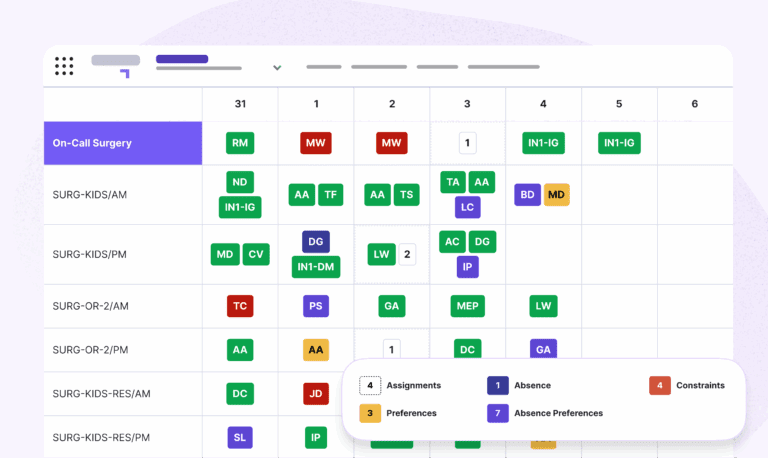
Automated scheduling allows departments to configure those requirements directly into the scheduling process. Rules around spacing, vacation periods, availability, coverage, and other constraints are considered when schedules are generated, while live visibility helps leaders identify gaps as conditions change.
For a department chief, the benefit is greater confidence that the schedule reflects how the department is supposed to operate.
Petal users make 400,000+ shift trades and transfers per year.
For administrators: Less time managing the schedule around the schedule
Administrative teams often absorb the hidden cost of spreadsheet scheduling.
They collect availability. Build assignments. Enter vacation requests. Coordinate replacements. Update files. Communicate changes. Then answer questions about whether the latest schedule is actually the latest schedule.
The spreadsheet itself may be inexpensive. The hours required to maintain it aren’t.
- At CHUM, moving away from manual Excel scheduling resulted in 98% less time spent creating workforce schedules and a 70% reduction in scheduling costs.
Automation doesn’t eliminate the administrator’s role. It changes where administrative time goes.
Routine rules are applied automatically with automated schedules. Absence requests are centralized. Physicians participate directly in shift swaps. Coverage gaps are surfaced without someone manually reviewing every cell.
Administrators become managers of exceptions instead of human version-control systems.
The mobile difference: Your schedule goes where you do
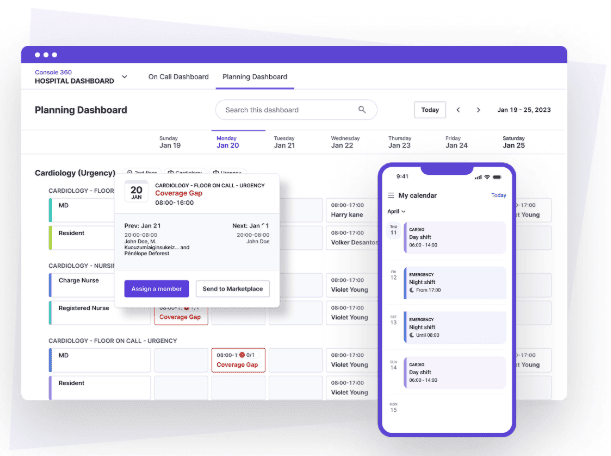
There is another fundamental difference between a spreadsheet and modern physician scheduling software: one was built as a file. The other offers a mobile workflow that takes it beyond the 1990s.
That matters in healthcare.
Physicians move between units, clinics, hospitals and home. They may need to know who is on call, check tomorrow’s assignment, or respond to a shift request without being at a workstation.
Mobile scheduling makes that possible.
Instead of finding an attachment or checking whether a downloaded spreadsheet is current, physicians access the live schedule and see approved changes as they happen. Healthcare scheduling platforms also provide notifications and mobile shift-management capabilities.
The difference sounds simple, but it changes how teams interact with scheduling every day.
One more thing spreadsheets can't do: Connect the team securely
A schedule answers an important question:
Who is working?
In healthcare, the next question is often just as important:
How do I reach them?
Spreadsheets were never designed to manage clinical communication. Teams frequently compensate with phone lists, emails, personal texts, or another directory that may or may not reflect current coverage.
When scheduling and secure clinical communication are connected, the live schedule can help staff identify the correct on-call provider and reach that person through an approved communication channel.
Some healthcare workforce platforms now combine real-time on-call calendars, secure messaging, and mobile schedule access within the same workflow.
That becomes particularly valuable when a schedule changes unexpectedly. Finding the right person shouldn’t require checking one system and then searching another for their contact information.
Move beyond maintaining the spreadsheet
Your patients are best served when you have time for them.
Gestion des effectifs includes Automated Scheduling to help healthcare teams save time and gain faster access to the information they need.
Physicians, department chiefs, and administrative teams enjoy advanced features, such as:
- Moteur de planification automatisé pour l'équité et la justice
- Alertes automatisées et sécurisées en temps réel au personnel concerné
- Messagerie sécurisée et conforme pour les fournisseurs et les équipes
Ready to see what automated scheduling could change for your department? Speak with a Petal scheduling expert today.
Enjoy the benefits of efficient billing:
FAQs: Automated scheduling vs. Spreadsheets
What’s automated physician scheduling software?
Automated physician scheduling software helps healthcare teams create and manage schedules using configured rules, physician availability, preferences, absences, and coverage requirements.
Is automated scheduling better than Excel for physician schedules?
Excel may be sufficient for simple and predictable schedules. Automated scheduling becomes more valuable as departments add complex rules, frequent changes, multiple sites, or on-call coverage.
Can physicians access automated schedules from their phones?
Many modern scheduling platforms provide mobile access that allows physicians to view current schedules, manage eligible shift exchanges, submit availability, and respond to changes.
How does automated scheduling help department chiefs?
It provides greater visibility into coverage, workload distribution, scheduling rules, and potential staffing gaps while reducing the need to manually validate every assignment.
Does automated scheduling reduce administrative work?
Yes. Automation can reduce repetitive work related to schedule generation, absence management, shift swaps, updates and version control, so administrators can focus on exceptions requiring their attention.
Can physician scheduling software include secure communications?
Some healthcare workforce platforms connect real-time scheduling and on-call information with secure clinical messaging, allowing teams to identify and contact the appropriate provider within a connected workflow.