





Points clés à retenir
- Seeing your real workflow reveals usability: A realistic billing scenario shows how many steps stand between a patient encounter and a submitted claim.
- Strong validation protects billing accuracy: Automated checks identify potential errors before payment delays and extra administrative work can arrive.
- Local expertise matters in Canadian billing: Software should account for your province, specialty, compensation model, and day-to-day billing requirements.
A medical billing software demo should show you how the solution fits your real billing workflow toward preventing errors, tracing claims through payment, managing rejections, providing expert support, and protecting healthcare data. Asking targeted questions during the demo makes it easier to compare vendors based on what their software will do for your practice.
Software demos can make or break a healthcare team’s future financial and operational success.
Choosing wisely matters because healthcare teams have little capacity for inefficient implementation or misaligned technology.
- In fact, Canada is projected to face a shortage of approximately 117,600 nurses by 2030 and has a current deficit of 22,823 family physicians. Among all physicians, 46% report high levels of burnout. Technology must give time back to care teams.
Medical billing software simplifies much of the revenue cycle. Modern platforms centralize claim entry, validation, submission, payment tracking, reconciliation, and reporting. But features listed on a website tell you only so much.
A demo is your opportunity to see those capabilities in action.
Instead of sitting through a standard product tour, bring your own questions and scenarios. Ask the vendor to demonstrate how their solution would handle the work you complete every day.
Start with these seven questions.
1. Can you show me how I would bill a typical patient encounter?
Start with the basics: Show me how I would use this.
Give the vendor an example that reflects your practice and ask them to walk through the entire workflow. For example:
- How do you enter patient information?
- Select a billing code?
- Add modifiers?
- Submit the claim?
Pay attention to the number of steps involved and how intuitive each one feels.
Modern billing platforms often provide saved information, quick-entry tools, mobile access, workflow automation, and integrations that reduce repetitive work.
Remember: A good demo should leave you able to picture the software fitting into your work day.
2. How does the software catch billing errors before claim submission?
Correcting a rejected claim takes time. Ideally, errors are caught before submission.
Ask the vendor to demonstrate the software’s validation process using an intentionally incomplete or incorrect claim.
Depending on the platform, automated validation may identify missing patient information, invalid billing codes, incompatible code combinations, missing diagnoses, required billing elements, or incomplete claim information.
Then look closely at what happens next as you consider the software’s capacity in the context of your team’s needs.
Your patients and providers need their data protected.
3. How does the software support my specialty and province?
Medical billing varies considerably across Canada.
Fee schedules, claim requirements, incentives, documentation expectations, and reimbursement rules differ by province. Your specialty and compensation model introduce additional considerations.
So, make the demo specific.
Ask the vendor to show workflows and billing scenarios from your province and specialty. Find out how provincial billing updates enter the platform and how quickly changes are reflected.
Tip: If the vendor only demonstrates generic workflows, then seek specific examples or the need to explore alternatives that meet your unique situation will be needed.
4. What happens after I submit a claim?
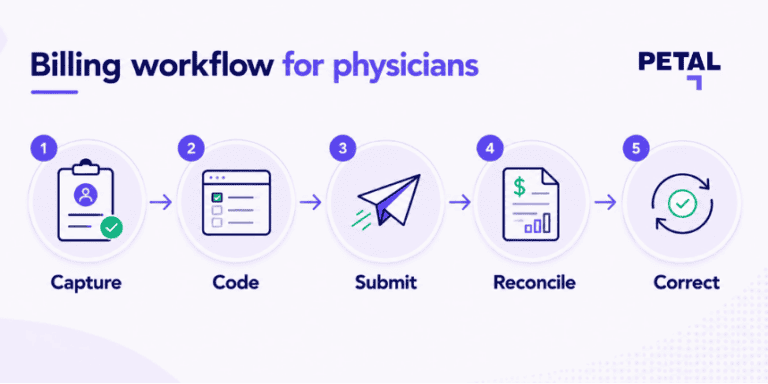
Seeing a claim successfully submitted feels like the natural conclusion of a billing demo.
But don’t stop there.
You still need to know whether the payer processed the claim, whether the expected amount was paid, whether anything was adjusted or rejected, and whether follow-up is required.
Ask the vendor to show you the full journey. Questions include:
- Can you quickly distinguish submitted, paid, outstanding, adjusted, and rejected claims?
- Can you access remittance information?
- How does payment reconciliation work?
Centralizing this information will give you greater visibility into your billing activity.
The fundamental question: Did I get paid correctly for the care I provided?
5. What happens when a claim is rejected?
Even experienced physicians encounter rejected claims.
During the demo, ask the vendor to open one.
Look at how the platform identifies the rejection and communicates the reason. Then ask them to demonstrate the correction and resubmission process.
You should also establish who is responsible for each step.
Some solutions leave rejection management entirely with the physician or clinic team. Others include tailored support, such as through billing specialists who review remittance statements, explain rejection reasons, assist with corrections, and more.
Physicians reported 9.4% more revenue and 161 hours saved on average annually using Petal Billing.
6. What billing support do I get when the software can't solve my problem?
Automation catches common issues, but some billing questions still require judgement or detailed knowledge.
Find out exactly what happens in those situations.
The distinction between general and specific billing challenges matters. Billing specialists may assist with claim follow-up, payment inquiries, reimbursement questions, and other complex scenarios that software can’t independently resolve.
Ask for a concrete example of an issue the support team would manage and what the process would look like from beginning to resolution.
Additionally, be sure to check what support is turnkey versus premium priced.
7. How will you protect my patients' and practice's data?
Billing software handles sensitive healthcare and financial information, making security an essential part of vendor evaluation.
Ask where your data is hosted and where backups are stored, because data sovereignty is critical to protecting your patients’ and providers’ data. Next, find out how data is encrypted, how access is controlled, and what happens during an outage or disaster.
Then ask for evidence.
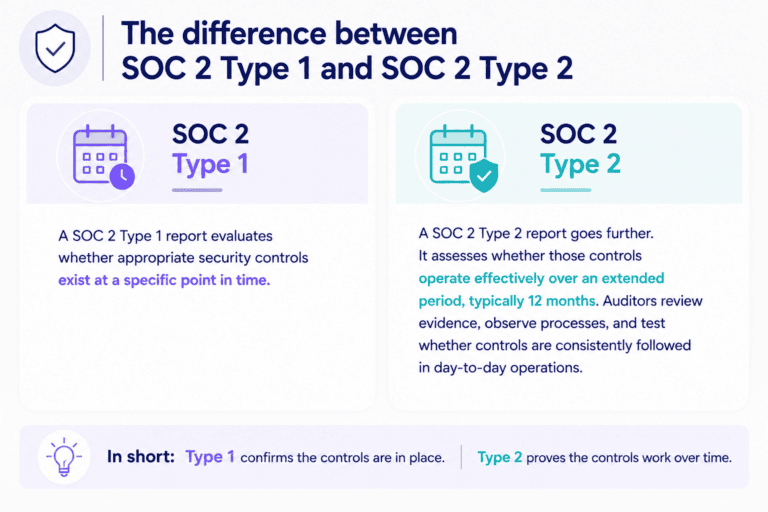
Independent assessments such as a SOC 2 Type 2 report provide third-party evidence that established security controls operate effectively over time.
- Did you know? Petal meets industry-leading security and compliance standards, including alignment with GDPR and other global privacy frameworks.
Security evaluation should also consider data residency—given its vital role in assuring your data remains in the right hands—as well as encryption, interoperability standards, continuous monitoring, and independent assessments.
Remember: Clear answers are important. Your vendor should be able to explain where healthcare data lives and how it’s protected.
Make your medical billing demo count
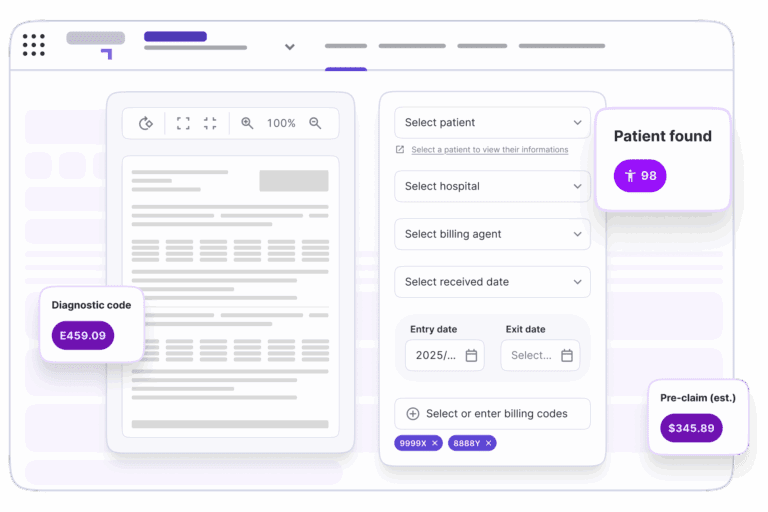
Feature lists make medical billing platforms look similar. A thoughtful demo exposes the differences.
See how Facturation médicale combines medical billing technology with personalized support from billing specialists based in your province.
- Our tools are designed for 40+ medical specialties, and we process $3B+ in claims annually.
Assuring your software suits your workflow will support a higher claim acceptance rate and fewer hours managing rejected claims.
Your team and your patients gain when technology works for you.
Put the Petal demo to the test:
FAQs: Medical billing software demos
What should I ask during a medical billing software demo?
Ask vendors to demonstrate everyday claim entry, automated validation, province- and specialty-specific workflows, claim tracking, rejection management, billing support, and data security. Use real scenarios whenever possible.
What features should I look for in medical billing software?
Useful capabilities include automated claim validation, electronic submission, payment tracking, reporting, mobile access, secure workflows, and support for provincial billing requirements.
Why should I ask to see a rejected claim during a demo?
Claim submission is only one part of billing. Seeing how the platform identifies, explains, corrects, and resubmits rejected claims gives you a clearer picture of the administrative work required after submission.
Should medical billing software provide billing support?
Your ideal support model depends on your practice. Some physicians prefer self-managed software, while others benefit from access to billing specialists who assist with complex claims, reconciliation, rejection management, and provincial requirements.
How do I evaluate medical billing software security?
Ask where data and backups are hosted, how information is encrypted, what independent security assessments the vendor completes, and how disaster recovery works. A SOC 2 Type 2 report provides independent evidence about the effectiveness of a vendor’s security controls over time.
How can I compare different medical billing software demos?
Give each vendor similar real-world scenarios and evaluate the number of steps required, validation capabilities, visibility after submission, rejection workflows, available expertise, and security practices. A consistent approach makes meaningful differences easier to spot.